
How Timely iMac Repair Can Extend Your Device’s Lifespan
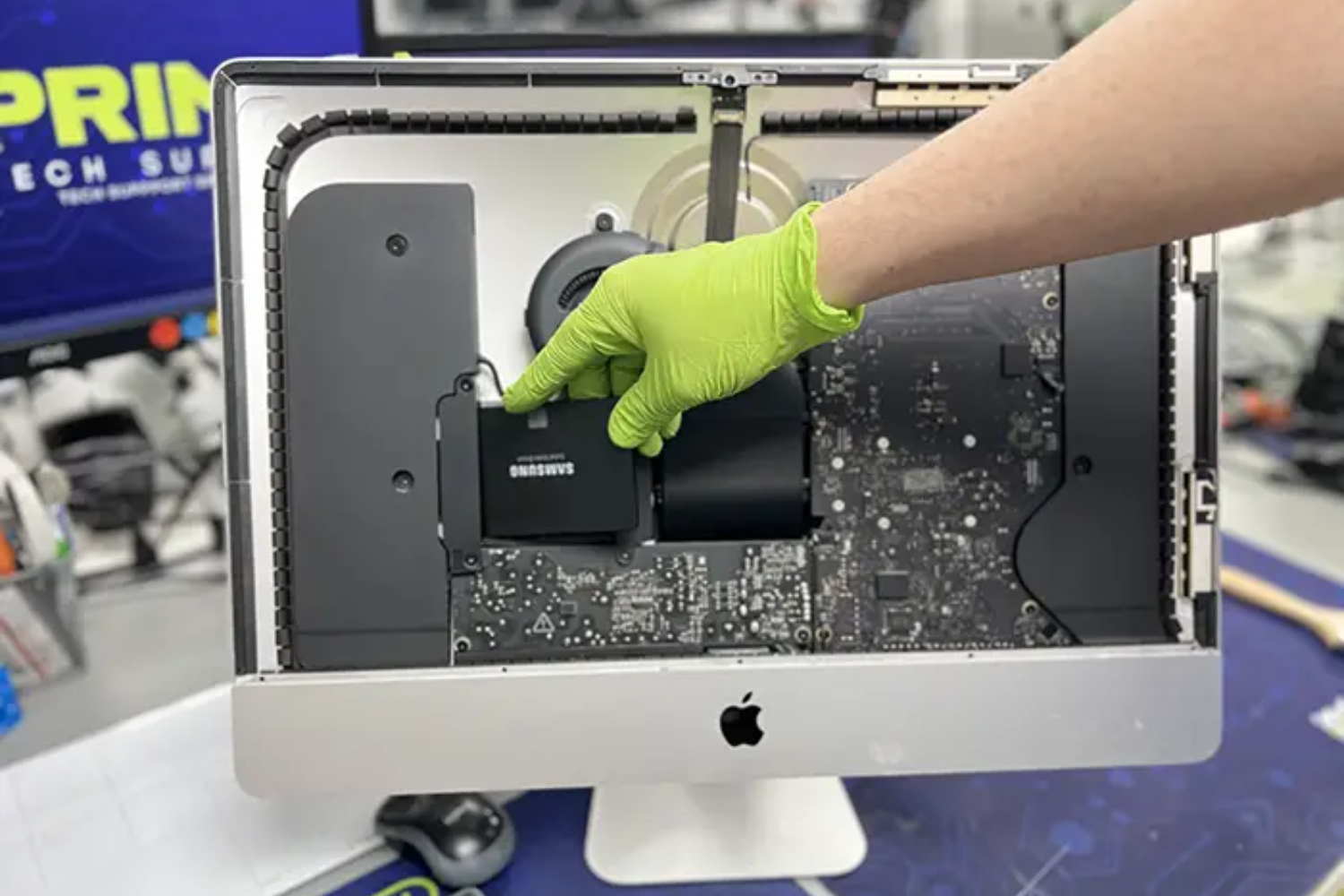
It's a typical humid afternoon in Dubai or Abu Dhabi. You're working on your 27-inch iMac Retina, editing a batch of 4K wedding photos for a client, while the air conditioning fights against the 48°C heat outside. Suddenly, the fans spin up aggressively like a small airplane taking off, the screen starts showing random green lines, performance stutters, and eventually the system shuts down to protect itself. What seemed like a minor annoyance quickly becomes a productivity killer.
Many iMac owners assume that once the machine starts showing age-related symptoms, it's time to start shopping for a replacement. But in reality, timely iMac repair can dramatically change that story. With proper early intervention, cleaning, component-level fixes, and preventive maintenance, most iMacs can remain fast, reliable, and fully usable for 10–14 years instead of the typical 6–8 years.
In this in-depth guide, we’ll explore in detail why acting early makes such a big difference, the specific issues that shorten iMac lifespan (especially in hot, dusty climates like the UAE), how professional repairs directly extend hardware longevity, real cost comparisons, warning signs you should never ignore, long-term preventive strategies, and frequently asked questions from actual users.
The Science Behind Why Timely Repair Extends Hardware Life
Every electronic component has a finite lifespan influenced by temperature, dust, voltage stress, and mechanical wear.
Heat is the #1 enemy of silicon. For every 10°C increase above 60–70°C, the failure rate of semiconductors can roughly double (based on the Arrhenius equation widely used in electronics reliability engineering).
Dust acts as thermal insulation and abrasive. It settles on heatsinks, reducing heat transfer efficiency, and on fan blades, causing imbalance and bearing wear.
Thermal paste (the compound between CPU/GPU and heatsink) dries out after 3–5 years, losing up to 70–80% of its heat conductivity.
When these factors combine unchecked:
- Components run 15–40°C hotter than design spec
- Thermal cycling (heating/cooling) stresses solder joints → micro-cracks → eventual failure
- Fans wear out prematurely → even less cooling
- Logic board capacitors age faster under heat stress
Timely repair breaks this vicious cycle by restoring thermal performance, reducing stress, and preventing cascading failures.
Real-world evidence: Many 2012–2015 iMacs (now 9–13 years old) with regular deep cleans, thermal paste replacement, and SSD upgrades are still running the latest macOS versions smoothly in 2025–2026, while neglected units from the same era frequently suffer total logic board failure.
Dubai & UAE Climate: Why iMacs Age Faster Here (and Why Early Repair Matters Even More)
The UAE environment is particularly aggressive toward electronics:
- Extreme daytime temperatures (regularly 42–50°C in summer) → parked cars can reach 65–75°C inside
- Very fine desert dust/sand that easily passes through mesh vents
- High indoor-outdoor temperature swings (AC at 22°C → 45°C outside)
- Long daily usage hours (many professionals keep iMacs running 10–14 hours/day)
These conditions accelerate every major failure mode:
- Battery swelling in all-in-one design (very expensive repair if ignored)
- Thermal paste drying 30–50% faster
- Dust accumulation 3–5× quicker than in temperate climates
- Higher incidence of solder joint fatigue and capacitor degradation
Users who bring their iMacs for proactive maintenance every 12–18 months (clean + paste + inspection) consistently report:
- Operating temperatures 15–35°C lower under load
- Fans remaining quiet even during heavy work
- No unexpected shutdowns
- Much lower chance of logic board failure
Most Common iMac Problems & How Timely Fixes Prevent Long-Term Damage
1. Severe Dust & Debris Buildup
Symptoms: Loud fans, hot chassis, throttling, random shutdowns
Consequence if ignored: Chronic overheating → GPU/CPU degradation → logic board failure
Timely solution: Professional deep clean (disassembly, compressed air + isopropyl, anti-static vacuum) every 12–18 months in UAE
Benefit: Restores factory-level cooling → extends CPU/GPU life by years
2. Dried-Out / Ineffective Thermal Paste
Symptoms: High idle temps (55–65°C), fans always loud, throttling after 10–15 minutes of load
Consequence: Accelerated aging of chips and solder joints
Timely solution: Replace with high-quality paste (Arctic MX-6, Thermal Grizzly Kryonaut, etc.)
Benefit: Temperature drop of 10–35°C → reduces thermal stress exponentially
3. Failing or Imbalanced Fans
Symptoms: Grinding/whining noise, vibration, one fan not spinning
Consequence: Uneven cooling → hot spots → localized damage
Timely solution: Cleaning or complete fan replacement (OEM or high-quality aftermarket)
Benefit: Prevents hotspot failures and maintains balanced airflow
4. Storage Drive Degradation
Symptoms: Slow boot, beach ball, Time Machine errors, random freezes
Consequence: Complete data loss, system instability
Timely solution: Upgrade to modern NVMe SSD (2012–2019 models) or replace failing Fusion Drive
Benefit: 5–10× faster performance + dramatically higher reliability
5. Display Cable / Backlight / GPU Issues
Symptoms: Flickering, lines, backlight bleeding, sudden black screen
Consequence: Complete display failure (very expensive)
Timely solution: Cable reseating, GPU reflow (older models), or full display assembly replacement
Benefit: Preserves the expensive Retina panel for many more years
6. Power Supply & Capacitor Aging
Symptoms: Random power-offs, clicking noises, won't turn on
Consequence: Sudden total failure
Timely solution: Capacitor replacement or PSU refurbishment
Benefit: Prevents catastrophic board damage
Cost Comparison: Prevention vs. Catastrophic Failure
| Repair Type | Approximate Cost (AED) | Prevents Much More Expensive Failure? | Lifespan Extension Potential |
|---|---|---|---|
| Deep clean + thermal paste refresh | 350 – 650 | Yes – prevents overheating damage | 3–6+ years |
| Fan replacement | 500 – 950 | Yes – avoids hotspot failures | 2–5 years |
| SSD upgrade / Fusion Drive fix | 800 – 1800 | Yes – prevents data loss & slowness | 5–8+ years |
| Full display replacement | 2200 – 4500 | No – already late-stage | 3–5 years remaining |
| Logic board repair / replacement | 3500 – 9000+ | No – very late stage | Limited |
The math is clear: investing 500–1500 AED every 1.5–2 years in maintenance can save 5000–15000 AED in major repairs and delay new purchase by many years.
Key Warning Signs — Act Immediately
- Fans constantly loud or one-sided
- Chassis too hot to touch comfortably during normal use
- Noticeable slowdown after 10–20 minutes of work
- Random restarts/shutdowns
- Visible dust around vents
- Storage warnings or very slow boot
- Screen artifacts/lines/flickering
- Clicking or buzzing from power supply area
Free diagnostics from reputable repair centers can confirm whether it's minor or serious—don’t delay.
Long-Term Preventive Maintenance Checklist for UAE Owners
- Place iMac on hard, elevated surface with good airflow
- Never operate in direct sunlight or near heat sources
- Clean external vents monthly with compressed air
- Schedule professional deep clean + paste refresh every 12–18 months
- Use temperature monitoring apps (iStat Menus, Macs Fan Control)
- Keep macOS and apps updated
- Maintain 25–35% free SSD space
- Use quality surge protector/UPS
- Backup religiously (Time Machine + cloud)
- Avoid sleeping the iMac for weeks—restart weekly
Frequently Asked Questions
Q: How many years can a well-maintained iMac realistically last? A: 10–14+ years is common for models from 2012 onward with regular care.
Q: Is thermal paste replacement really necessary? A: Yes – after 4–6 years, it loses most effectiveness in hot climates.
Q: Should I repair a 2013–2015 iMac or buy new? A: Almost always worth repairing if logic board is intact. Upgrades make them faster than many new entry-level machines.
Q: Can timely repair maintain Retina display quality? A: Yes – fixing cables/backlight early prevents full panel failure.
Q: How much does a full professional maintenance service cost? A: Typically 450–850 AED in 2026 prices, depending on model and shop.
In summary, timely iMac repair is one of the most powerful ways to protect your investment. By addressing dust, heat, and wear early, you dramatically reduce stress on critical components, avoid expensive cascading failures, maintain peak performance, and enjoy your iMac for many additional years.
In the challenging UAE climate, this proactive approach is not optional — it’s the smartest way to maximize value and minimize downtime.
For expert, thorough iMac maintenance and repair using high-quality materials, professional tools, detailed diagnostics, and strong warranties, visit iStore Dubai. Our experienced technicians specialize in UAE-specific issues and are dedicated to giving your iMac the longest, healthiest life possible. Contact us today for a free check-up — your future self will thank you.

 English
 Arabic
 French
 Spanish
 Portuguese
 Deutsch
 Turkish
 Italiano
 Russian
 Romaian
 Portuguese (Brazil)
 Greek
Greek